"Can you show me how to do that again?"
Your staff answer that question every day. This answers it for residents — in your brand, in 76 languages, live in a week. We build it FREE!
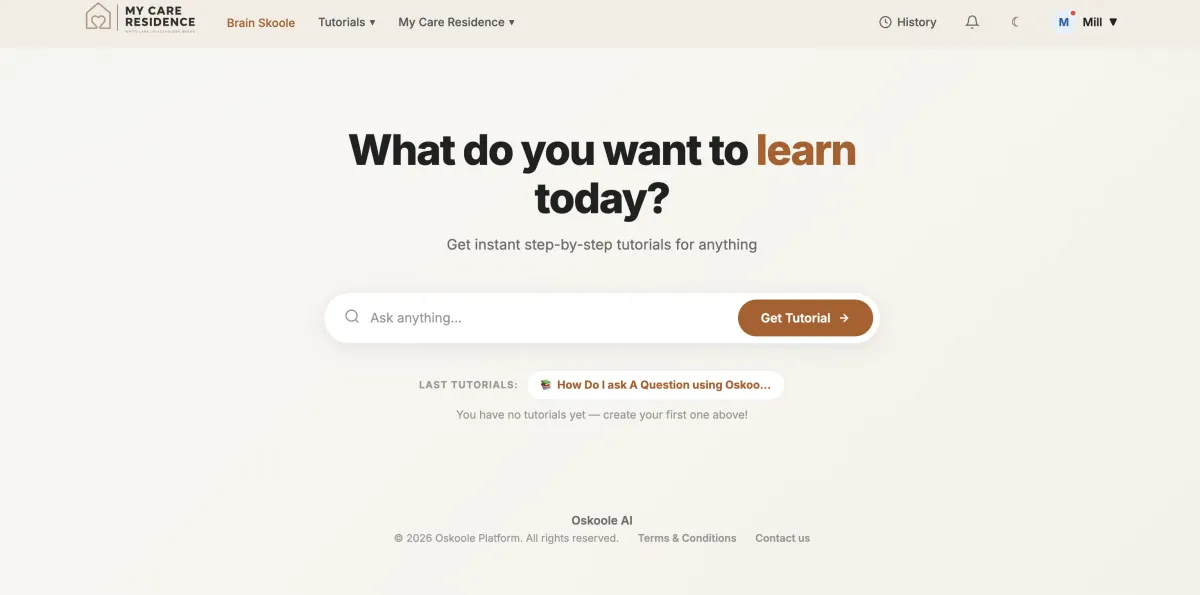
Oskoole gives your residents patient, plain-language help with the technology they actually use: video calls, photos, banking, cyber safety.
No Build Cost. Live In 7 Days. You only pay per resident, per month.
Live in 7 days
Your logo and colours
76 Languages
Spoken and Written
Hosted in Australia
Resident data secure
No lock-in
Monthly billing per user
The world went digital.
Your residents didn't get a vote.
Centrelink moved to myGov. The local bank branch closed. The GP does telehealth now and the specialist sends the referral by email.
Nobody asked your residents whether they were ready for any of it, and nobody is coming back to check. So they ask your lifestyle coordinator. Then they ask again next week, because nobody remembers a thing they were shown once while feeling embarrassed.
Oskoole isn't a lifestyle extra. It's access to things residents are already entitled to — at the touch of a button, at 2pm or 2am, as many times as they need it.
What White Label
Actually Means
It is your platform, your visual identity, and your standard of care: presented under your facility's trusted branding.
Any Question, Answered on Demand
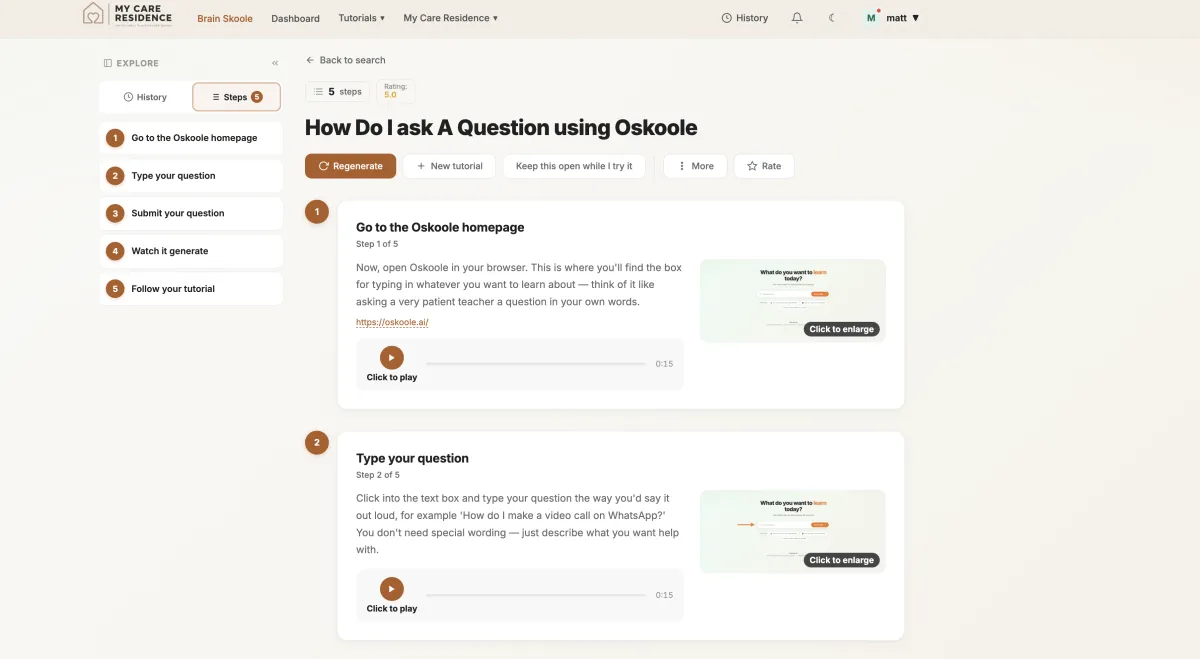
A resident asks the question in their own words. The answer comes back as a step-by-step tutorial built for that question — real screenshots, written instructions, and a human voice reading it aloud. Not a search result. Not a phone number.
A Library for the Things That Matter Most
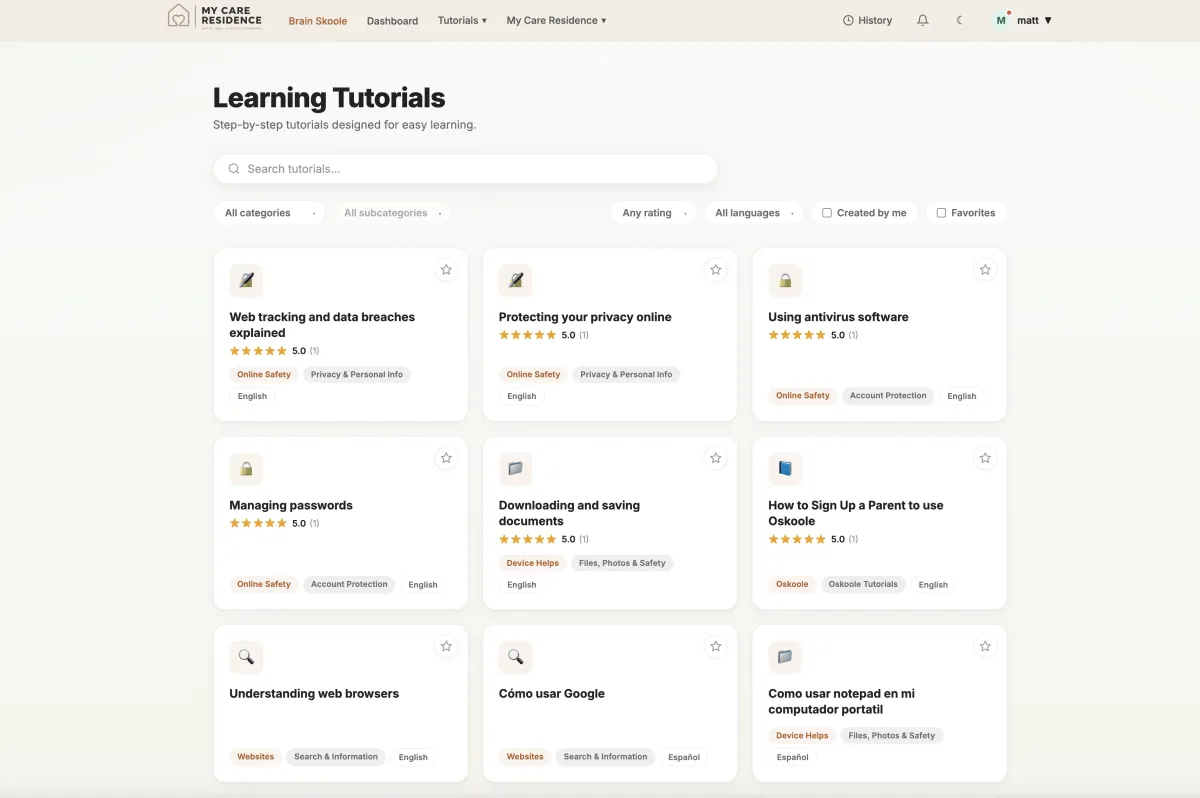
Short tutorials covering video calls, messaging, email, banking, government services and staying safe online. At their own pace, in their own time, as often as they like.
In the Language They Actually Speak
Every tutorial is spoken and written in 76 languages. More than a third of older Australians who speak a language other than English don't speak English well — yet almost all technology support is written in English only.
For a culturally diverse village, this is a concrete answer to culturally appropriate care. Not a policy statement. An actual service.
How Set-Up Works
01
You Send Us Your Brand
Your logo, your hex colours, and the website links you'd like included — your contact page, your family portal, whatever residents should be able to reach. Then a CSV of the residents who want access.
No software to install and no devices to buy: it runs in a web browser on the devices residents already have.
02
We Build and Configure It
Your branded platform goes live within 7 days, with staff training built into the system itself. We don't charge to build it. No training day to schedule, no travel cost.
03
We Maintain It
Zero ongoing IT burden for your operational team. We handle all compliance updates, data backups, and technical infrastructure updates seamlessly in the background.
What It Costs
Nothing to build. One number after that, and it moves with your occupancy.
No setup fee. No devices. No training fee. No minimum term. Brain Skoole included at no extra cost.
Your Branded AI Assistant
We build it, brand it and maintain it. You send a logo, your hex colours and the links you want included.
FREE
Per Resident, Per Month
Agreed with you based on the size of your site. Billed on actual residents using the platform.
From $6.99/mnth
If a resident leaves, you stop paying for them that month. Residents can added and deleted from your own dashboard.
Some Questions
Answered
Nobody builds anything for free - what's the catch?
No catch. We create revenue on the monthly subscription, and only if your residents actually use it. We'd rather have live villages producing real usage data than a build fee. There's no lock-in, which means if residents don't use it, we're the ones who lose.
Why pay for Oskoole when Be Connected is free?
You shouldn't have to choose - use both. Be Connected is a genuinely good library of general courses. But it's exactly that, a library: the resident has to find it, navigate it, and work out which of many modules answers their question. Be Connected is in English and carries the government's brand, not yours, and also gives you no usage data.
Oskoole answers the specific questions a resident needs answering, in their own language, under your name, and reports back on who's using it.
Each are quite different, and we believe that each has their role to play in assisting residents with technology.
Be Connected, digital literacy classes and Oskoole all have their role to play.
Who actually pays for Oskoole - us or the residents?
Oskoole can be offered as an organisation-funded service, included as part of your resident offering, or made available through resident-paid subscriptions.
The first is most practical, and offering Oskoole as par of your resident offering is adding value: it can be funded from the marketing or lifestyle budget rather than recurrent charges, because adding a new line to recurrent charges triggers consultation and potentially a ballot depending on the state. Framing it as a sales and occupancy tool rather than a resident service usually makes it a much easier internal approval.
Residents can be added in or removed by the operator at the touch of a button, giving them full control over the amount residents using Oskoole.
If a resident follows a tutorial and gets scammed, who does that land with?
Oskoole is a digital education and support tool - not a guarantee against scams. Our tutorials are designed to help residents understand technology and recognise potential risks to help make more informed decisions.
The platform never asks a resident for banking credentials or financial details and doesn't store them. Tutorials show a resident how to use their bank's own app — we're never in the middle of a transaction.
No technology platform can guarantee that someone will never be scammed. We can help people build the knowledge and confidence to recognise risks before they become a problem, give advice on how best to avoid them.
Oskoole doesn't replace your organisation's existing policies, procedures and staff support. It adds another layer of assistance and education.
Is this going to create more work for our staff?
Quite the opposite. A resident's technology problem is no longer a staff problem. Oskoole gives residents somewhere to ask before they turn to your staff. It's not about replacing human support, it's about taking some of the repetitive, every day technology questions off your team's plate, and giving residents more confidence to solve things themselves.
What happens if a resident doesn't use it?
You can take that resident off the system, and you stop paying for them.
Staff training is built in - you have a full report on activated users monthly rather than signups, giving you full control of the amount of users on your platform.
Brain Skoole gives residents an added reason to open Oksoole on a good day, with brains to keep the brain active.
Can we cancel or adjust our plan if operational priorities change?
Yes. All enterprise contracts operate on flexible 30-day rolling adjustment terms following the initial 90-day pilot. There are no penalty clauses, and your team retains full data export rights in standard formats at all times.
Can we see it in action before we commit?
We are happy to give you a full run down and demonstration of how it works and how it can benefit your residents and your staff. We're happy to demonstrate in person, depending on your location.
Fifteen Minutes, And
You'll Know
We will show you a live village platform, explain exactly how the internal Dashboard works and how your nominated Supervisor can monitor usage.

© 2026 Oskoole. Melbourne, Victoria. powered by eggn.io.